
Units In Stock
This section of Easystoneshop will provide you with the opportunity to take a total control of units of your products. You know already that to be able to work in this section you had to create a category and add a concrete product: granite, marble, etc. A detailed description of how to do that can be found in a tutorial Starting your web Inventory.
So, what's the use of spending time and adding these units to the service? The answer is ready - database of information and quick search of what is needed. For example, a common situation. Some client has bought a few slabs, another client reserved a bundle, one of your blocks needs to be allocated for a serious job and finally the last one asked if you had a remnant of some special slab. You have dozens of them, you do not know exactly and maybe you have alreafy sold the promised slabs and forgot about that. Each slab can be unique, each client has his own wishes and contact information.

Summing it all up, we must say that saving this data at once using easystoneshop, no mattrer how much time passes or wherever you are it will be always possible to answer your client's requirements.

An important thing to mention here is that we went here ahead skipping for now the “Editing product” section which has relation to options described in the "Editing Product" tutorial.
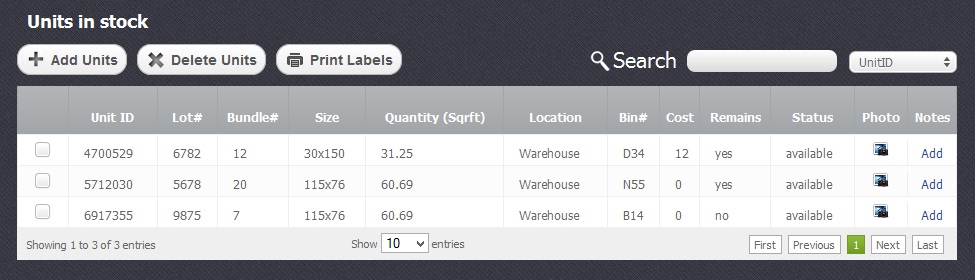
In the picture below you can see already a list with added products and the explanation how to create one. Search of the added units is made according to “Unit Id”, “Lot”, ““Bundle”, “Bin”, “Location” parameters. Only one of them is active at a time.
Adding the units to this section, you actually describe them. The first convenience which offers this section is that if these slabs are identical, you do not have to add and describe each slab separately, but will be able to set the quantity number of adding at once, as soon as you click on "Add Units" button. To see all the possible fields in the window that will open, a "Save product" button of the "Editing products" section had to be pressed.
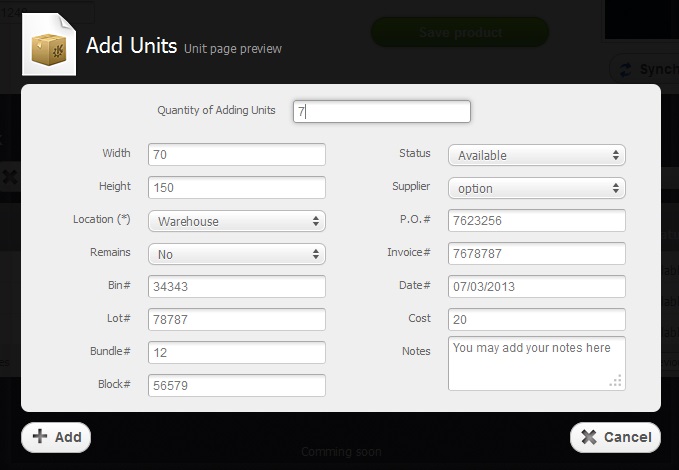
- Fields like size, data parameters and “Bin”, “Lot”, “Bundle”, “Block”, “Notes” seem to be clear, but there are some which require special attention.
- The filed “Location” indicates where the units are situated. It can be a warehouse, a showroom or your own created location with the help of “Settings” module.
- The field “Remains” gives you a chance to mark if the unit is a remnant or not and changing its size parameters to preserve the unit ID.
- A very useful thing is a possibility to set the "Status" of units, to separate so to speak “absolutely free” or available units, “busy” - hold or allocated for someone and those which are sold.
- “P.O#” and “Invoice#” fields exist for convenience of connection clients and their orders, especially in case of arising some troubles.
- The last that should be born in mind is that the field “Cost” shows s a price for one unit of the product no matter what quantity of adding units has been set before.
After adding your 16 units you return to the upper screen, "Editing product" section to provide general information concerning the product. The units you added get tied to your newly added product and it appears in the table of products on the main screen of the Inventory module.





