
Profile
This is the main screen of the "Employees" section with the "Profile" menu opening automatically as the first one. Here you can finish adding your employees or edit the information concerning the already existing ones.
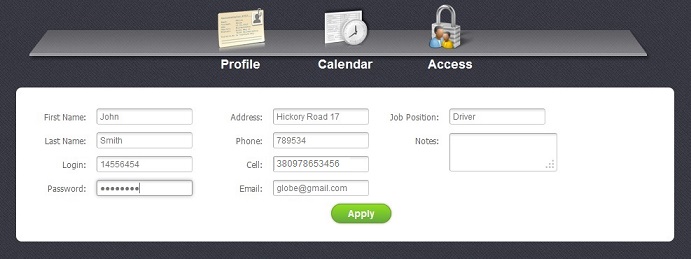
In this section you may add or edit the following data:
- First Name and Last Name - Employee's name
- Login and password - Information needed for the access to easystoneshop
- Address and Phone - Information needed to contact the employee
- Job Position - Employee's post
- Notes - A field where you can add some additional information of your choice.
Special attention here must be paid to Cell number and its format. In the picture above you can see the correctly provided cell number - 38 097 8653456. Where 38 is a country code and 0978653456 is a local number. No "+" before a country code is required.
After you have filled in all the necessary fields do not forget to click on "Apply" button to save all the changes.


