Tasks
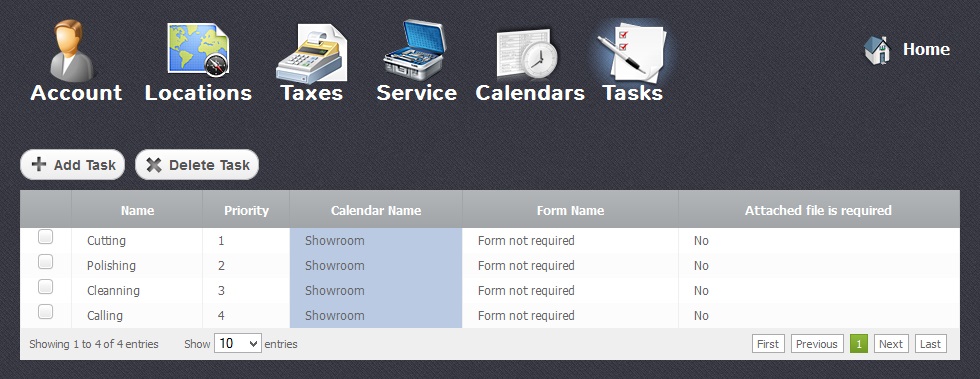
With the Tasks module you can edit and control list of tasks which have be done. Add new and delete the completed ones.
Adding Tasks
Return to topTo add a new task you have to click on “Add Task” button. Before your new task appears in the list, you have to fill in all the necessary fields as it is shown in the picture below.
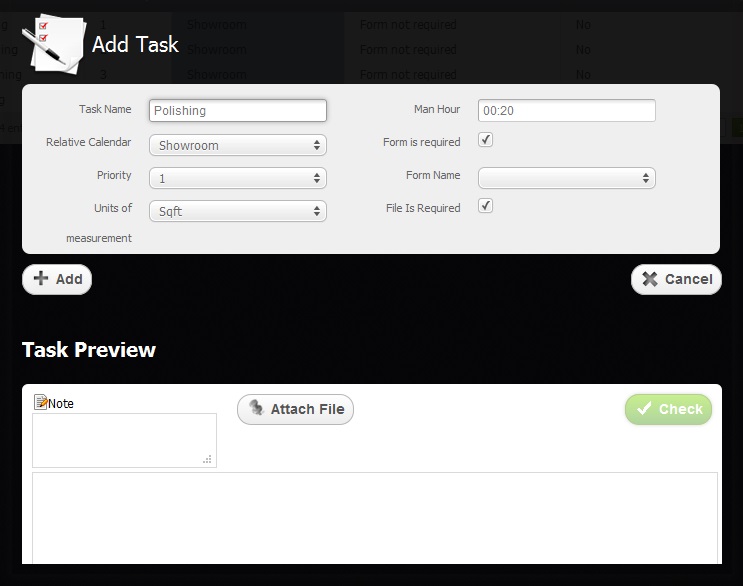
Here you should type the following data:
- Task Name – Name of the task
- Relative Calendar - Type of the calendar appointed for the definate types of tasks
- Priority – Position in the line of execution
- Attached file is required - The field which shows the necessity of the file being attached to the task
- Units of measurement – For definate types of tasks you choose corresponding types of units
- Man Hour - Time for which one person manages to work with 1 unit of measurment chosen for the task.
To apply fields "Form is required" or "File is required" you just have to select the checkbox  and click on "Apply Button"
Deleting Tasks
Return to top
To delete an existing task you have to select a chechbox and click on "Delete Task" button which is shown in the picture below. Please be careful, because after that you will not be able to renew the deleted task.