
Price list
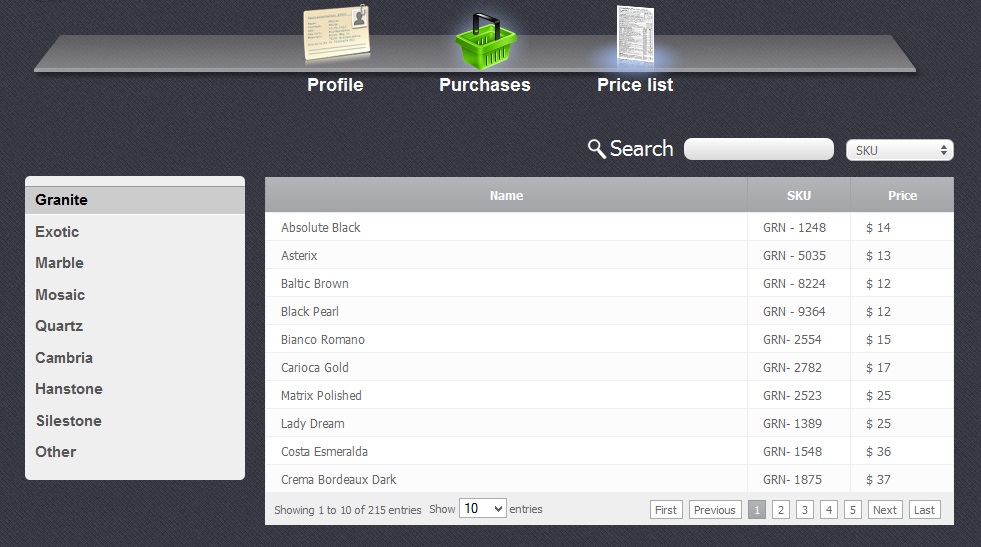
With the "Price List" section you can see the products from your supplier, their prices, the quantity of units being in stock and search the necessary ones. In the picture below you can see the list of products' types to the left hand and the list of products themselves to the right hand.
Working with Table
Return to topThe table is divided on several columns:
- Name – Name of the product
- SKU - stock-keeping unit is a number or code used to identify each unique
- Price – price for a single unit of the concrete product
To sort data according to each column of the table, you just have to click on some column name. If you click on the same column once again the sort direction will be changed.
In case if quantity of some product is less than you need to have in stock then it will be highlighted with a read color.
Searching Products
Return to topAbove the table you can find search control group.

In the droop-down menu near the search field you need to select a column name where you would like to search. After that enter a key word and as a result you will see that the product list is reduced.
Products Details
Return to topIf you click on one of the columns, the the following window with two tables will appear:
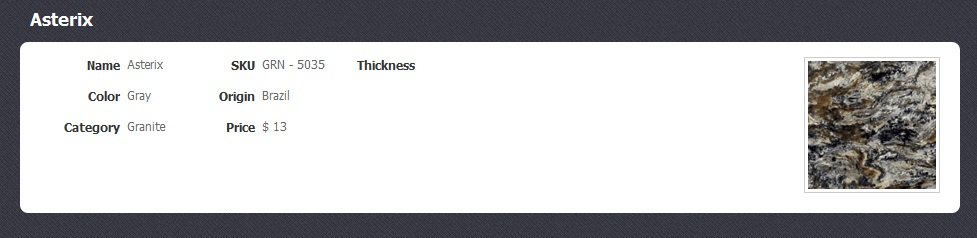
In the first picture you can see the information concerning the product:
- Name - Name of the product.
- Color - Color of the product
- Category - Category of the product
- SKU - Stock-keeping unit is a number or code used to identify each unique
- Origin - A place where the product comes from
- Price - Price for one unit of the product
- Thickness - One unit's thickness
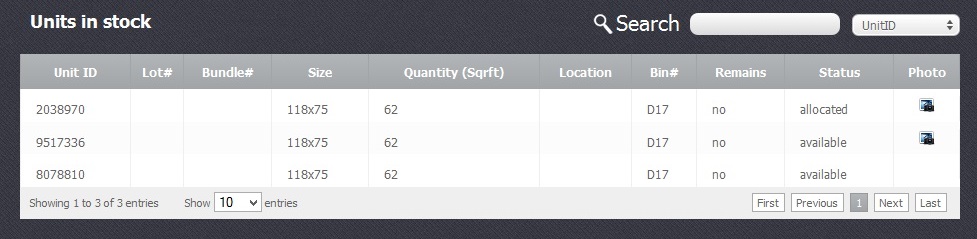
In the second picture you can see the units which are in stock. This table is divided into 10 columns.
- Unit ID - Name of the unit in a form of a code generated automatically.
- Lot# - Number of unit's lot
- Bundle - Number of unit's bundle
- Size/ - Unit's size
- Quantity - Quantity of the units in stock
- Location - Place where the shop is situated
- Bin# - Number of unit's bin
- Remains - shows whether the unit is a remnant or not
- Status - Status of the unit: available, hold, allocated, sold
- Photo - Attached photo if any


